Offline expression generator · macOS

Your mockups should sound played, not programmed.

Palpito is an offline MIDI CC expression generator: it drafts phrase-aware CC1 and CC11 curves for orchestral sample libraries — the swells, the leans, the breath between notes — so your line arrives already breathing.

Double opt-in · one email with your download link — no spam, ever.

Offline. Your music never leaves your machine. Deterministic. Same input, same curve. Zero AI. Rule-based, by design.
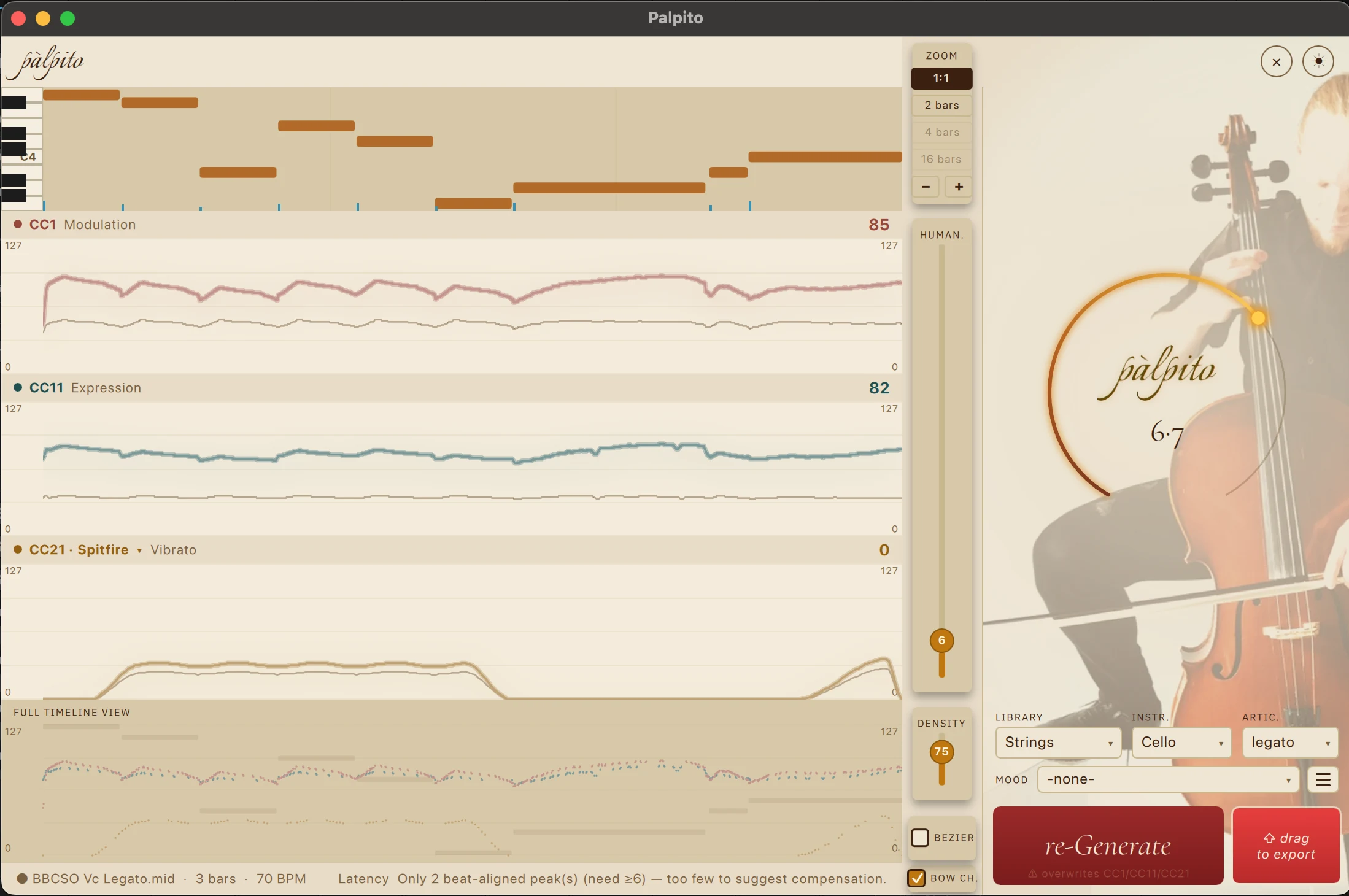
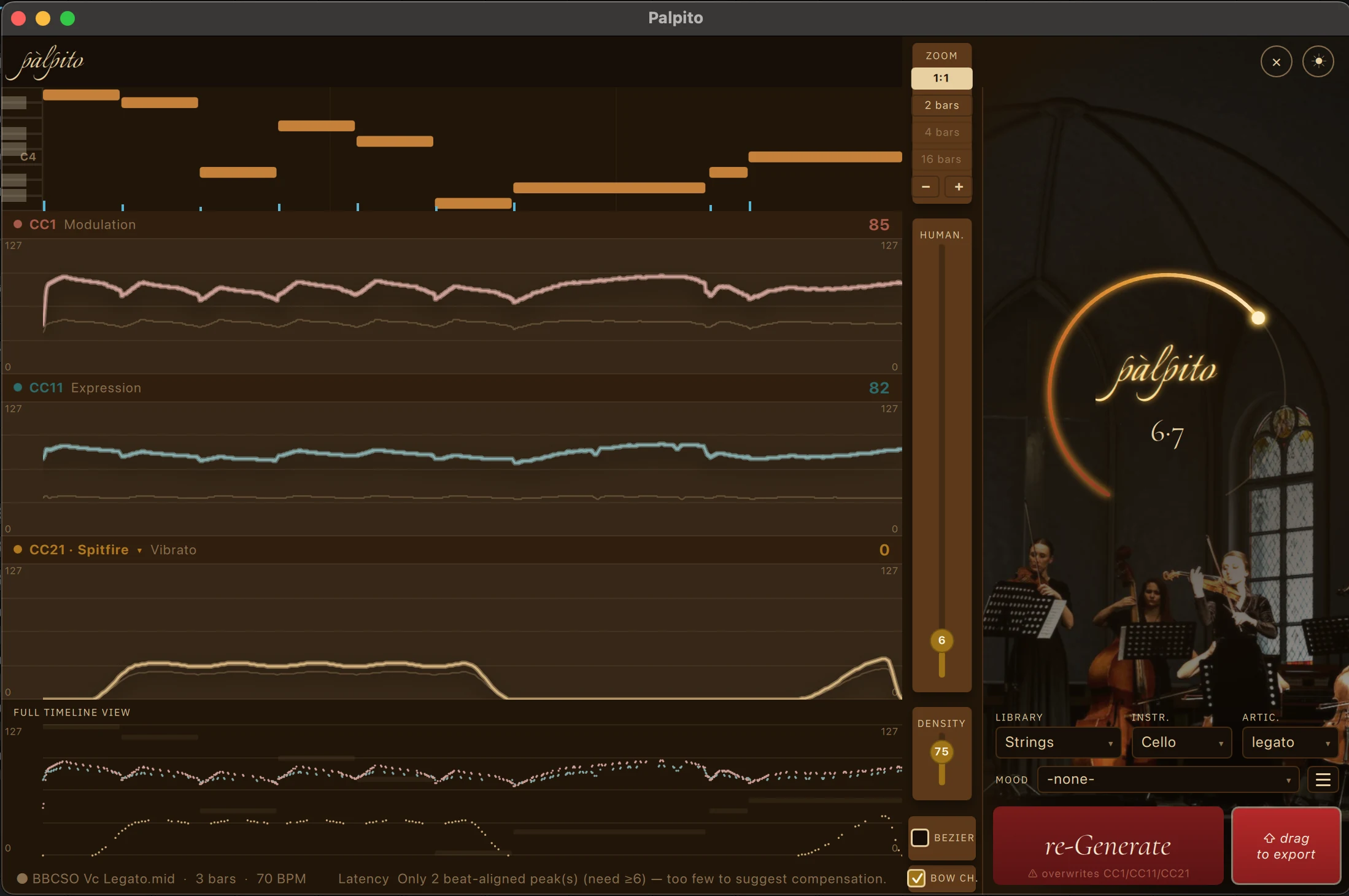
Palpito's dark interface with Saint-Saëns' The Swan loaded on solo cello: the piano roll with generated CC1, CC11 and CC21 expression lanes, the intensity arc set to 6.7, and bow changes on.
The real app — The Swan (Saint-Saëns) on solo cello, CC lanes generated by Palpito.
Why Palpito exists

The hours that make it sound alive are the hours you never get back.

I'm a working media composer, and I still am — Palpito came out of my own daily struggle. Riding expression by hand, note by note, is the most time-eating part of a mockup — hours of lane-drawing standing between the sketch and the next idea. Most of us render the sketch, wince a little, and move on.

So I spent years researching what actually separates a convincing line from a fake one: how players breathe, bow and phrase, how each sample library maps dynamics, expression and vibrato, the physics of air and bow — and distilled it into a deterministic engine. Knowledge, not a black box.

Here's my honest stance: a skilled composer riding CC by hand, given the time, will always beat any tool. Palpito never questions that. It exists to give you that time back — a draft that already breathes, so your hours go to the music, not to drawing lanes.
A colleague on the second screen

Not a plugin you forget in a channel strip.

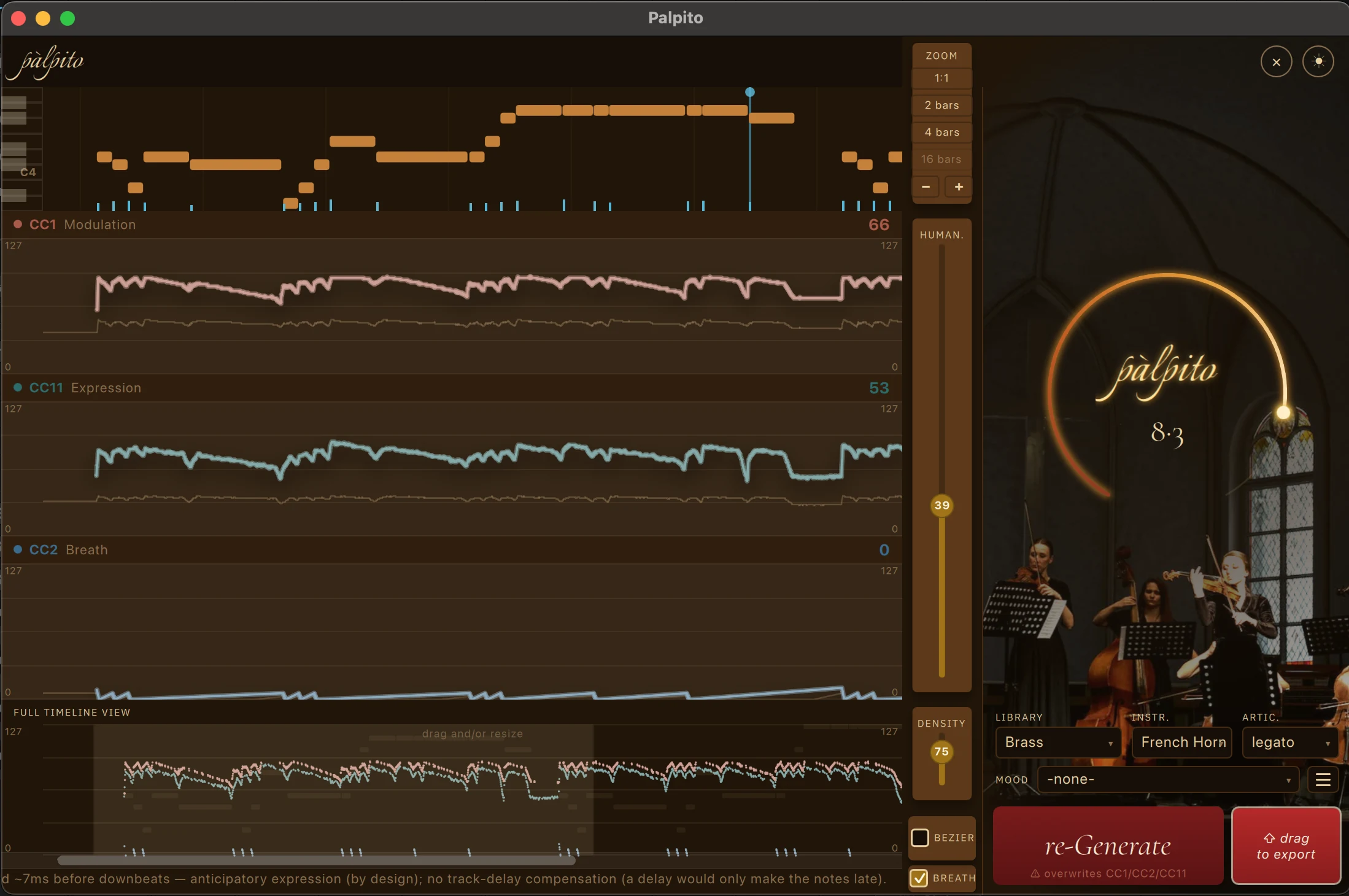
Palpito is a companion app: it sits open next to your DAW while you work. Drop a part in, generate, drag the result back onto the track. It guides while you go — the status bar explains the anticipatory expression and suggests the exact track-delay compensation; the lanes show why the curve does what it does.

  1. 1Drop your MIDI in. One instrument or a full section — Palpito reads the notes, rests and overlaps and finds the phrase boundaries.
  2. 2Generate. Pick library, instrument and articulation; set the intensity arc and humanize. The curves are drawn per passage, per instrument.
  3. 3Drag it back. The result drags straight into your DAW track as standard MIDI, CC lanes written in. Audition, tune to taste, stay the performer.
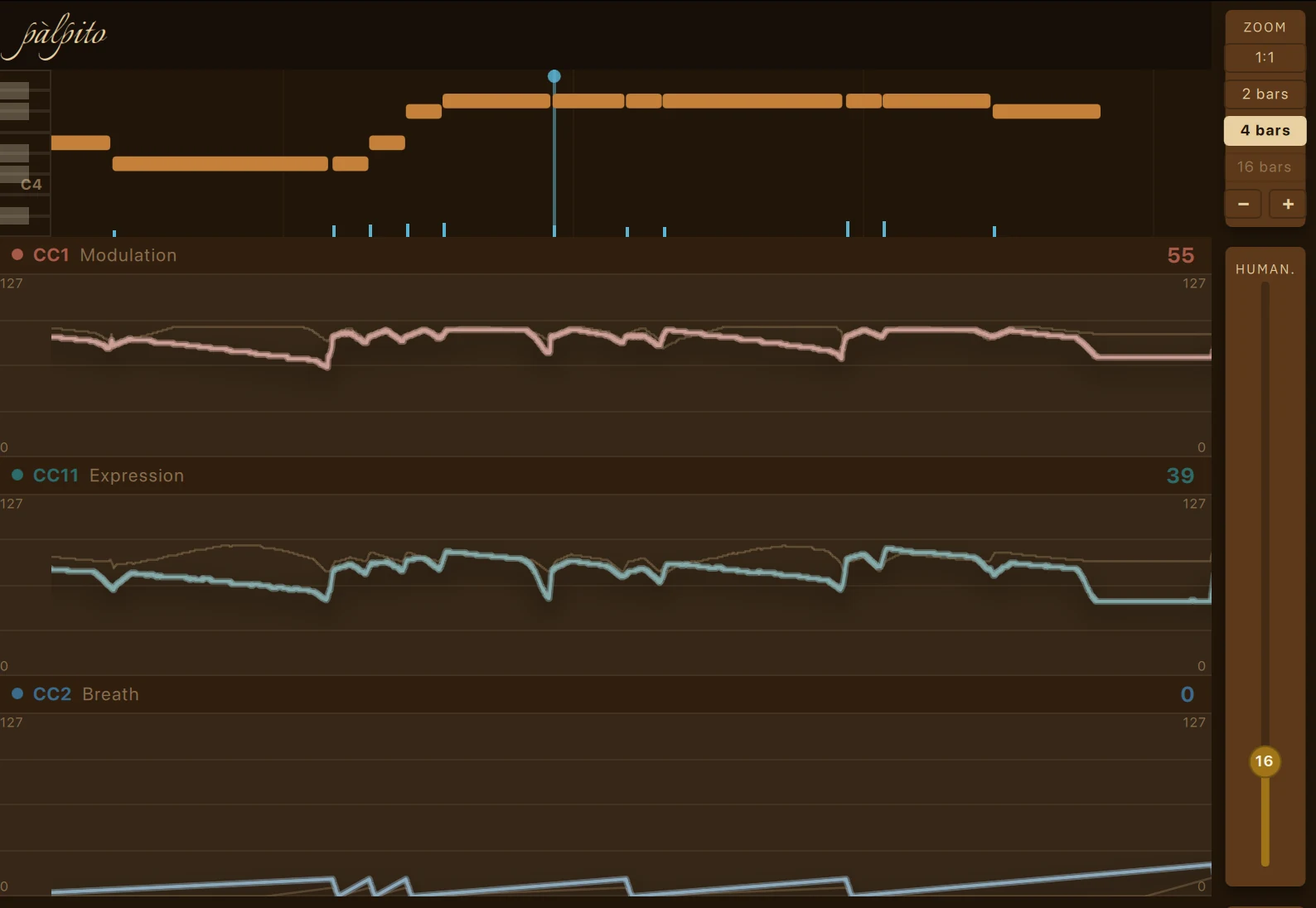
Palpito zoomed to four bars on a Tchaikovsky horn line: the CC2 breath lane, the full-timeline drag and resize strip, and the status bar explaining anticipatory expression.
Working close-up — a horn line at a 4-bar zoom, the status bar explaining the anticipatory expression as you go.
What it actually does

Every line, shaped the way a player would shape it.

Phrase-aware CC1 + CC11

Two controllers, two different jobs.

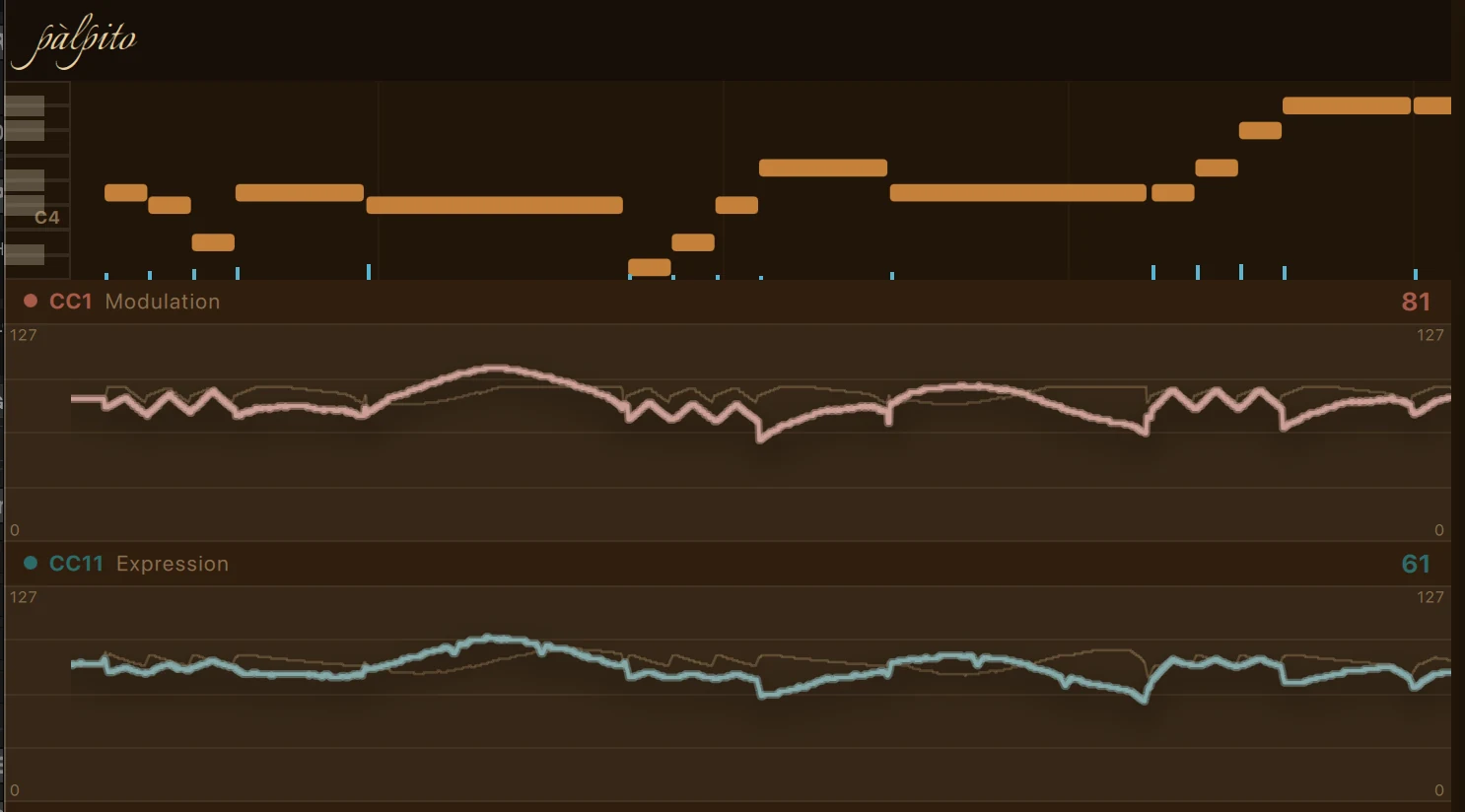
CC1 carries the broad dynamic arc — the timbre opening as it gets louder. CC11 does the finer, faster shading on top. Palpito shapes both to the phrase and references them to the tempo, so loudness rises toward a peak and relaxes at the close — played, not sprinkled at random.

Palpito's CC1 Modulation and CC11 Expression lanes: CC1 carries the broad dynamic arc while CC11 draws its own finer, faster shading on top — two visibly different breathing curves.
Real engine output — CC1's broad arc, CC11's own finer shading on top. Click to zoom.
Breath · anticipatory expression

Curves that prepare the note.

Winds and brass get real breath behavior: Palpito marks the breaths right in the piano roll and draws the matching dips in the CC lanes — you see where the player would breathe, and the curve doing it. And it changes per instrument, following each one's mechanics and the published breathing literature: a flute at forte runs dry in seconds, an oboe almost never — so their lines breathe differently.

The status bar spells it out — it explains the anticipatory shaping and tells you the exact track delay to dial in your DAW, or that none is needed. No guesswork left on your side.

Palpito on a brass line: the CC1 and CC11 lanes with their matching dips where the player breathes, and the dedicated CC2 breath lane below.
A brass line — the CC2 breath lane and the matching dips in the CC1/CC11 curves above. Click to zoom.
Vibrato

Vibrato that behaves like a hand.

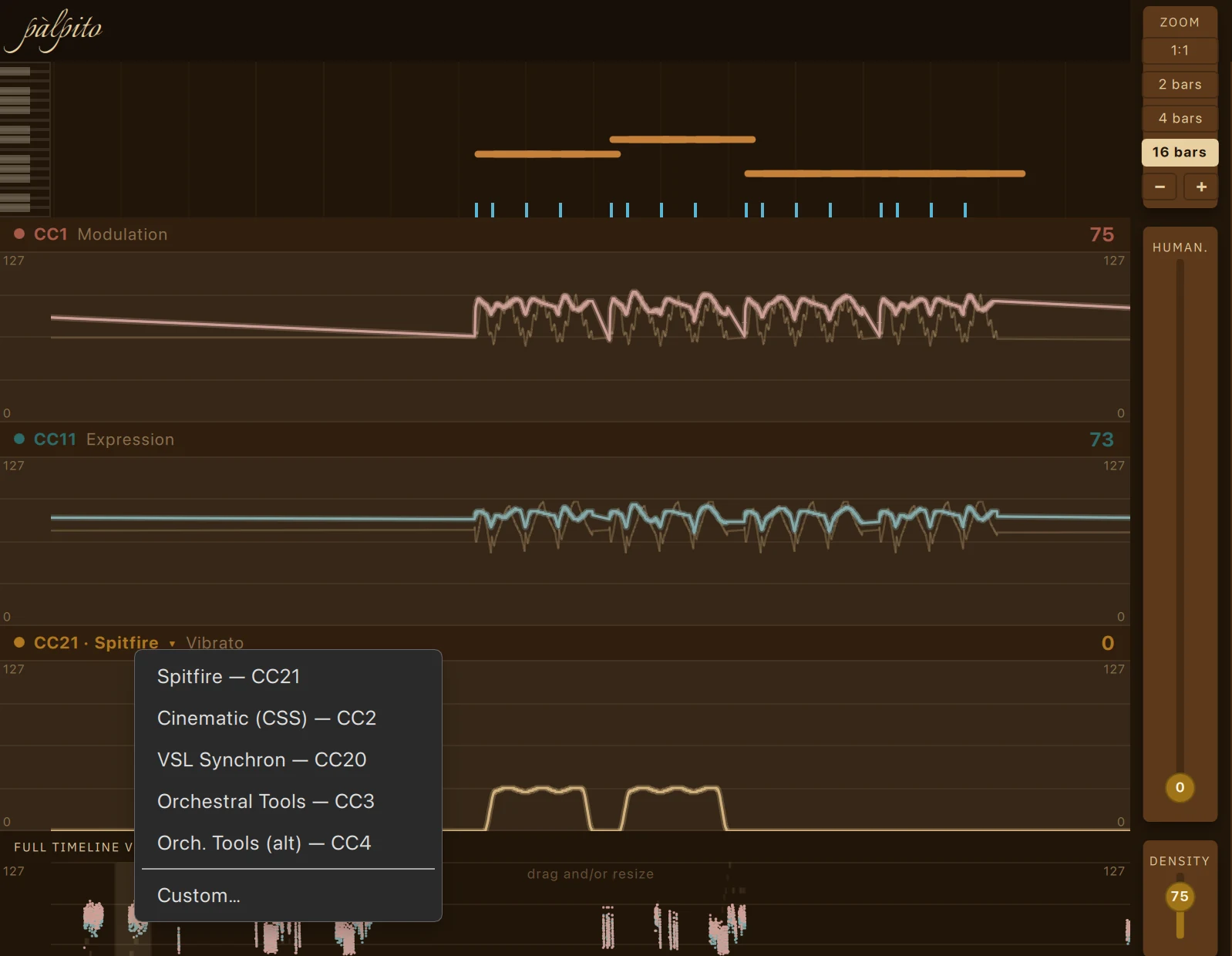
Real players don't switch vibrato on with the note — it arrives late and deepens as the phrase leans. Palpito draws exactly that: onset delayed per instrument, depth following the phrase. It gets its own lane, labeled for the library you picked — CC21 · Spitfire — and the output CC stays yours to remap.

It also knows what a hand can't do: on an open string there's no finger to rock, so it draws no vibrato there. You can see it in the output — the open E's in this very phrase get none.

Palpito's CC21 vibrato lane with the per-library remap menu open — Spitfire CC21, Cinematic CSS CC2, VSL Synchron CC20, Orchestral Tools CC3/CC4, or Custom — the vibrato onset delayed and its depth following the phrase.
The CC21 vibrato lane, labeled for your library — with the remap menu open. Late onsets, phrase-following depth. Click to zoom.
The arc · Humanize · Density

Control without drawing a single point.

One intensity arc (1–10) sets how much the phrase leans; Humanize and Density add life and detail; curves can be smooth Bézier or stepped. For strings, bow changes are routed with real, tempo-spaced timing.

You shape the performance with a few dials — then export and refine in your DAW. It's a starting point you own, not a preset you're stuck with.

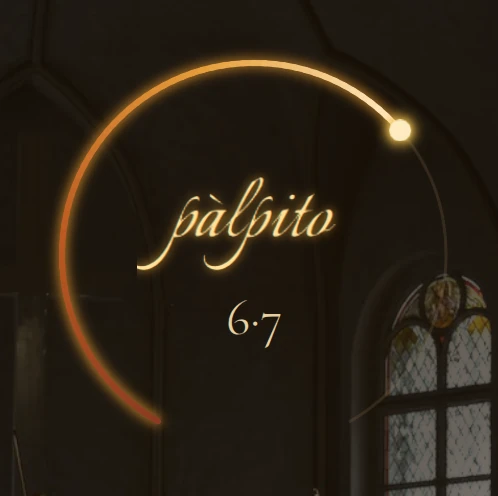
Palpito's circular intensity arc dial set to 6.7, the single control that governs how strongly each phrase leans.
The intensity arc at 6.7 — one dial governs how hard the phrase leans.
Library-, instrument-, articulation-aware

It knows a horn from a cello — and a legato from a spiccato.

One pipeline, three choices

Pick the library, the instrument, the articulation.

Choose your library, instrument and articulation, and Palpito tailors the curve to that combination — a horn arc peaks in a different place than a flute's, and legato phrases differently from a short. Re-generate as often as you like; the result drags straight to export.

Strings legato · long · détaché · marcato · portato · spiccato · staccato · tremolo · pizzicato · con sordino
Brass legato · long · marcato · portato · sforzando · spiccato · staccato · staccatissimo · stopped
Woodwinds legato · long · marcato · portato · sforzando · spiccato · staccato · staccatissimo · flutter
Keys sustain · staccato · spiccato · pluck · muted · hard · harmonic
Percussion & other sustain · staccato · spiccato · hit · roll

The articulation vocabulary, straight from the shipped profiles.

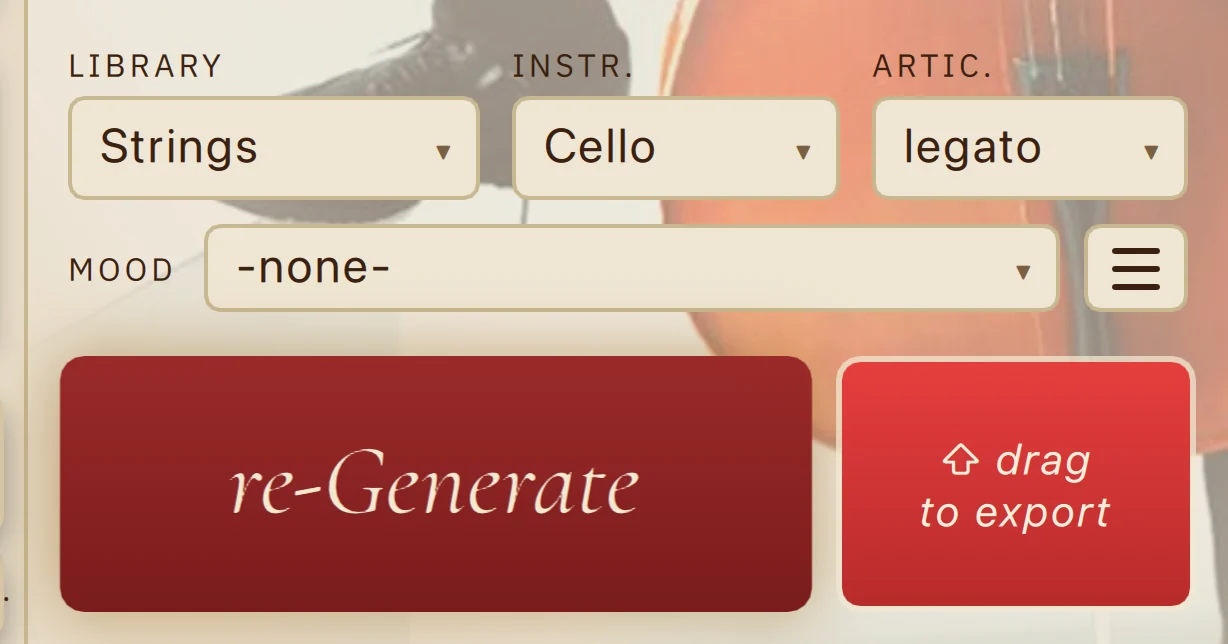
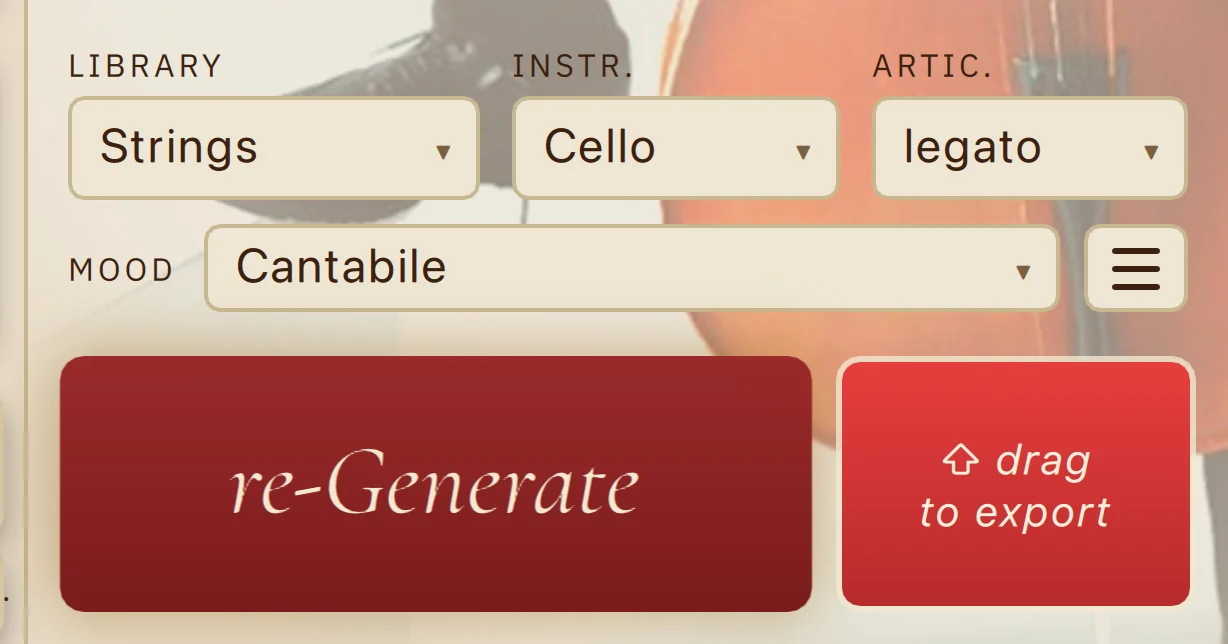
Palpito's selector row — Library, Instrument and Articulation menus with the Mood selector, the re-Generate button and the drag-to-export handle.
The library / instrument / articulation pipeline, plus re-Generate and drag-to-export.
Moods

One-click character, with Italian names.

A Mood is a one-click character preset. The names are Italian on purpose: it's my mother tongue — I built this app for myself first — it's the language classical music already speaks, and it's a musical language in its own right. So they read like legato, Intimo. A set ships free with the app; more unlock in Pro, and the app tells you honestly which is which: a locked one reads Intimo è un Mood Pro. No dark patterns, no bait.

  • Cantabile warm, singing
  • Delicato dreamy, shimmering
  • Sospeso tense, building
  • −none− clean neutral arcs
  • Intimo exposed, personal
  • Epico full power, climactic
  • Marziale heroic, assertive
  • Ostinato driving motor
  • Rimbalzo double-swell endings
  • Ondeggiato chord-to-chord swells

The full roster, exactly as it ships — 💎 marks the Pro Moods.

Palpito's Mood row with the free Mood 'smooth legato' selected.
A free Mood selected. Locked Pro Moods say so, in plain Italian — an honest upsell.
Light or dark — same engine, same curves
Palpito in its dark theme with The Swan on solo cello and full CC lanes generated.
Dark theme — the scoring-stage look.
Palpito in its light theme showing the same The Swan solo-cello project, the same generated CC1, CC11 and CC21 expression curves.
Light theme — the same project, the same generated curves.
Trust your ears, not our copy

The blind listening test

The opening phrases of The Swan (Saint-Saëns), solo cello. Two renders, same notes, same sampler, same mix — the only difference is the CC. One was drawn by Palpito. We won't tell you which; you decide which one breathes.

Blind A/B test

Same MIDI notes, same sample library, same mix. Only the expression (CC) differs between A and B.

A
Unlabeled render
0:00
B
Unlabeled render
0:00
Pick the take that sounds played — vote, and the reveal opens right here.
Your choice stays in this browser. Nothing is sent, stored or counted.
Coming soon

The blind render is being mastered.

We're finishing the pair so the comparison is honest — identical notes, identical sampler, identical mix. Leave your email and you'll be first to listen.

Notify me when it's live
The section test

One player is a soul. A section is many.

The first ritornello of Spring (Vivaldi), the string section. For this one, Palpito sat in each player's seat, one at a time — the principal, first violins, second violins, violas, cellos, basses — and gave each their own phrases, their own bow, their own breath. Six independent performances, combined. Same test, still blind.

Blind A/B test · the section

Same six parts, same sample library, same mix. On one side every part is flat; on the other, each of the six was expression-shaped individually by Palpito — individuality becoming harmony. Only the CC differs between A and B.

A
Unlabeled render
0:00
B
Unlabeled render
0:00
Same notes, same sampler — decide which section comes to life; vote, and the reveal opens right here.
Labels are strictly A / B. The reveal opens only after you vote.
Being rendered

The six section parts are still rendering.

Each seat — principal, violins I & II, violas, cellos, basses — is generated individually, then mixed into one honest pair. Renders pending. Leave your email and you'll be first to listen.

Notify me when it's live
The counter-position

Offline. Deterministic. No AI.

The market is stampeding toward "AI." Palpito goes the other way — and stays honest about where it doesn't help.

Nothing leaves your machine

Fully offline — no upload, no account to run it, no telemetry on your MIDI. Your work stays yours, full stop.

Deterministic, not a model

Same MIDI, same curve, every time — rule-based, computed from the notes and the library. No black box, no training on your music.

Where it won't help

A single static pad or a sparse two-note bed has almost no phrase to shape — draw those by hand. We'd rather earn the lines that matter.

A skilled composer with the time will always beat any tool. Palpito just gives the time back.

Palpito Pro · founding pre-order
One-time licence — never a subscription
€49 €99

Founding pre-order €49 · €99 from official launch, 22 October 2026.

Official launch in
00
Days
00
Hours
00
Min
00
Sec

Double opt-in · a single heads-up when the founding window opens. No charge today.

The free app stays free — the whole app for its core job. Pro is what I keep building on top: deeper per-library tailoring, more Moods, extended instruments, and advanced vibrato control I'm still working on.

One licence unlocks

  • Everything in Free — the whole phrase-aware engine, forever
  • Six more Moods, including two gesture Moods for endings & pushes
  • Keys, piano & tuned percussion — celesta, harp, marimba, vibraphone
  • Eleven extended instruments — piccolo and cor anglais to bass trombone & Wagner tuba
  • Colour articulations across every family — spiccato, con sordino, stopped brass, more
  • Three showcase presets, built-in and ready to load

Already on the workbench

  • In-lane intensity sliders & editable Bézier curves
  • Key-switch detection & management · tempo management
  • Multi-export batch · deeper per-library parametric tailoring
  • Advanced vibrato control & more Moods to come
See every Pro feature in detail →

Founding licence, founding price — locked for the life of the app.

What Pro adds

Everything free — and the deeper toolkit on top.

Here's exactly what ships in Palpito Pro at the 22 October 2026 launch. Every item below is built and in the app today — the real feature list, not a promise.

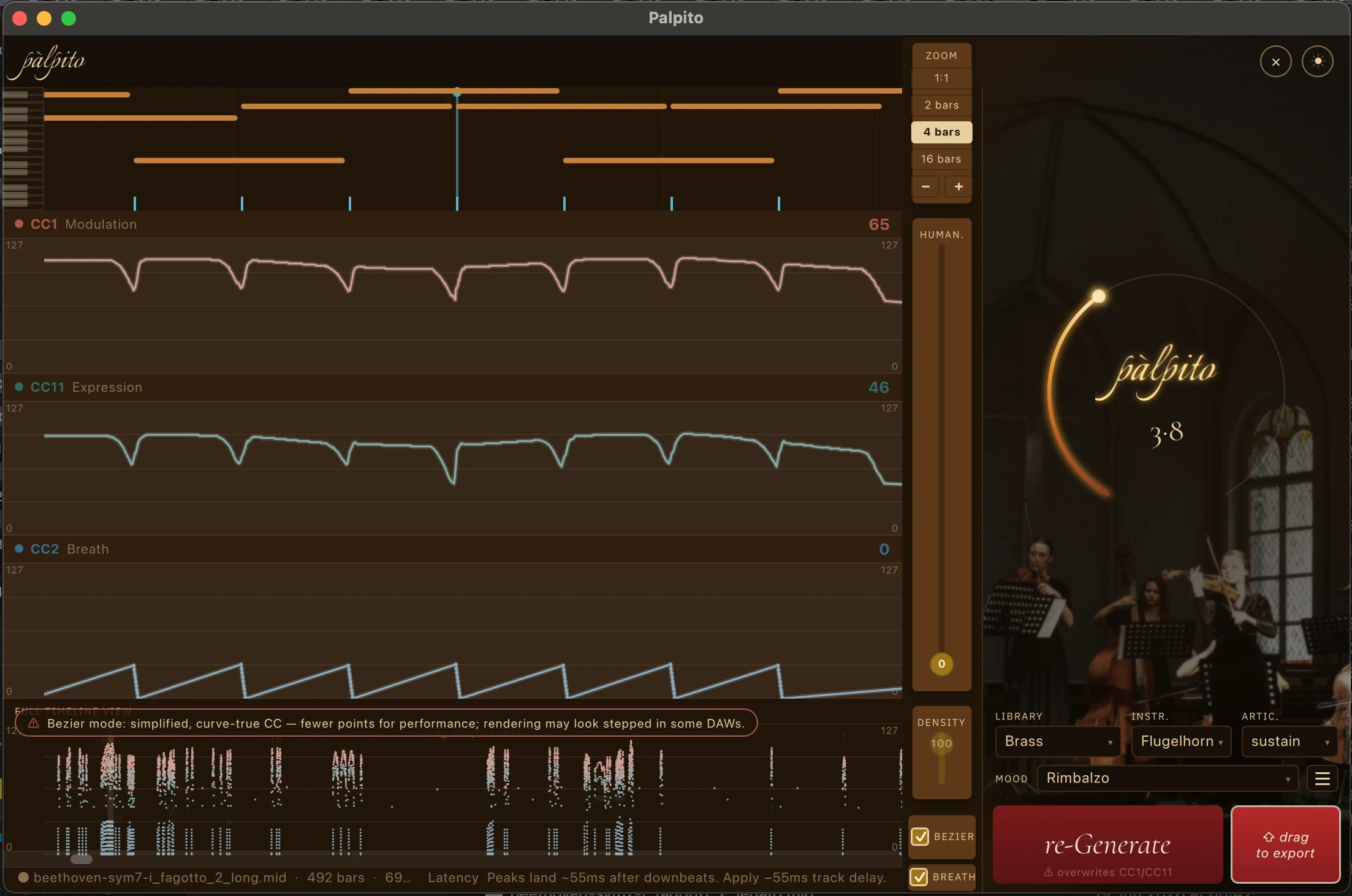
Palpito Pro in action: an extended-instrument flugelhorn line with a gesture Mood (Rimbalzo) selected, editable Bézier curves enabled, and the CC1, CC11 and CC2 breath lanes shaped across a four-bar view.
Pro in action — an extended instrument (flugelhorn), a gesture Mood, and editable Bézier curves, all at once. Click to zoom.
1

Everything in Free

The full phrase-aware engine — CC1, CC11, breath, the arc, the lot — for every composer, forever.

2

Six more Moods

Six additional Moods on top of the three free ones — including two gesture Moods that shape musical endings and pushes as one-click characters.

3

Additional percussion, keys & piano

The keys and tuned-percussion families: piano, celesta, harp, marimba, vibraphone, and melodic percussion.

4

Eleven extended instruments

Piccolo, alto flute, cor anglais, E♭ clarinet, bass clarinet, contrabassoon · piccolo trumpet, flugelhorn, bass trombone, cimbasso, Wagner tuba.

5

Colour articulations

Per family — strings spiccato, détaché, con sordino, portato; brass sforzando, spiccato, portato, stopped (hand-in-bell); woodwinds sforzando, spiccato, portato.

6

Three showcase presets

Built-in and ready to load: Epic Trailer · Inspirational — Smooth Legato · Epic Chords — LOTR.

And way more on the way

What I'm working on next — already on the workbench, each landing when it's proven: in-lane intensity sliders to fine-tune each layer · editable Bézier curves directly in the lanes · key-switch detection & management for the main libraries · tempo management · multi-export batch processing · deeper per-library parametric tailoring (the engine tuned to your library, not a generic average) · advanced vibrato control · the character and ear pass on the extended instruments, deeper keys & percussion behavior, and more Moods.

Every one of them lands in Pro as it ships — that's what the pledge below means.

The pledge

Buy Pro once — get lifetime access to every update and upgrade.

Pay €49 as a founding pre-order (€99 from launch), and lifetime updates are included — every update, every upgrade that follows. No subscription, no version treadmill, ever.

Who's behind it

One composer, one honest tool.

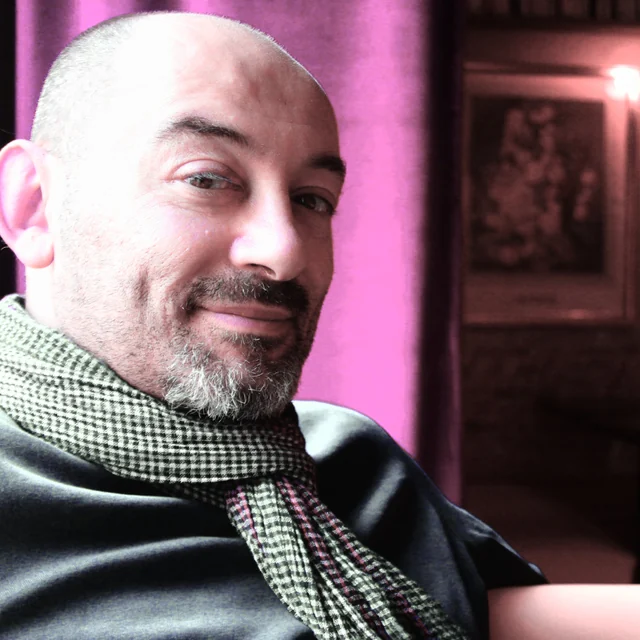
Andrea — the composer behind Palpito

I'm a working media composer in Italy, and a musician first — guitar and piano. To me, notes are only instructions; the performance is the message. That belief is the whole premise of Palpito, and the Moods carry Italian names because Italian is my mother tongue, the language classical music already speaks — and a musical language in its own right. Built for me first; shared because it works.

I built the engine from years of my own research, for composers in the same struggle I know first-hand. I'm also a fresh father — by adoption — with less time than ever and sharper priorities, which is exactly why giving time back matters to me. The core app is free forever; Pro is what funds the work and keeps it going.

— Andrea, media composer, Italy

Straight answers

Questions worth asking

Does Palpito use AI?
No. There is zero AI in the app. Palpito is deterministic — it drafts CC1/CC11 expression curves algorithmically from your MIDI and the target library's behavior. It runs fully offline, with no cloud and no machine-learning model, and never trains on your music. The same MIDI always produces the same curve.
What is CC11 expression — and how is it different from CC1?
CC11 is the MIDI expression controller. In orchestral sample libraries it shapes moment-to-moment loudness and phrasing on top of CC1 (dynamics/modulation), letting notes swell and taper the way a real player breathes through a phrase. CC1 carries the broad arc; CC11 does the finer shading. Riding only one flattens the result — Palpito shapes both. If you want to go deeper on real phrases, the free guide Make It Breathe walks exactly this ground.
Which libraries does it support?
Palpito is library-aware for major orchestral libraries including Spitfire BBCSO, Cinematic Studio Strings, VSL, EastWest and Orchestral Tools, and it is articulation-aware within them — so vibrato lands on the CC your library actually listens to (for example, the lane reads "CC21 · Spitfire"). Why every library wires vibrato to a different CC — and what that does to a mockup — is a story of its own: we wrote it down.
Which DAWs does it work with?
Any of them. Palpito reads and writes standard MIDI files — it never touches your session. Generate the curves, export the .mid, and drop it onto a track in Logic, Cubase, Studio One, Reaper, Pro Tools, or anything else that imports MIDI.
Is Palpito a subscription?
No subscription, ever. The app is free — that's the whole app for its core job, not a crippled trial. Pro is a one-time purchase: €49 pre-order before the 22 October 2026 launch, €99 after — and it comes with lifetime access to every update and upgrade that follows, no version treadmill. Founding price is locked for the life of the app.
Is there a Windows version?
macOS is signed and notarized today. A Windows build exists and works and is in beta — we can send it on request while code-signing is finalised. Leave your email, note that you're on Windows, and we'll get you sorted the moment signing lands.
Does my music leave my computer?
Never. Palpito is fully offline — no upload, no account required to run it, no telemetry on your MIDI. Your work stays on your machine, full stop. The only thing we ask for is an email to send your download link.
Free · offline · macOS

Give your lines their breath back.

One email, one download link. Draft the performance in minutes — then stay the performer.

Double opt-in · one email with your download link — no spam, ever.

click anywhere to close

Privacy notice